Tips and Myths About Extending Smartphone Battery Life
Photo
Credit Minh Uong/The New York Times
Ashlei Temeña’s family trip to Disneyland last Thanksgiving break turned into a nightmare when her smartphone battery hit empty.
Ms. Temeña, a San Francisco support technician, had gotten separated from her family and realized she had no way to find anyone. Instead of riding roller coasters, she wandered around searching for the group — eventually locating them four hours later watching fireworks.
“I wanted to throw my phone on the ground by the end of the day,” Ms. Temeña said.
Many consumers can relate. Despite the leaps forward in mobile phone technology with crisp, clear screens and faster chips, batteries have made only sluggish progress. That has propelled a desire for longer battery life to the top of the list of factors considered by consumers when they purchase smartphones, according to a 2014 survey by the research firm IDC.
So why is battery technology still underwhelming? Plenty of companies have been developing smarter battery technology for years, including methods to increase battery capacity tenfold or charge devices by pulling energy from the air. But lithium ion, the technology that most mainstream batteries are based on, is low cost and easily reproducible while being safe — so we’ll be stuck with it for the foreseeable future, said Charlie Quong, an executive at Mophie, a battery accessory maker, in an interview.
This article is part of a series of creative collaborations with The Wirecutter, a buyer’s guide to the best technology products.
“There’s a lot of investments on all fronts for improving the technology above and beyond that, but I don’t think we’re going to see that hitting any kind of mass market for several years out,” Mr. Quong said. In general, lithium ion improves about 10 percent a year in terms of the amount of energy that can be stored in a given space, which is partly why consumers perceive batteries as being far behind other technologies.
With that backdrop in mind, we teamed up with the Wirecutter, a product recommendations website, to run an array of tests to determine best and worst practices for preserving battery life on smartphones. For those who still need extra juice, the Wirecutter also picked some external battery products.
The results showed that some conventional beliefs about extending battery life — like turning off Wi-Fi or shutting down all your phone’s apps — produced negligible or even harmful results. The Wirecutter also found plenty of helpful practices to get more use out of your battery, like playing music stored directly on the device (instead of streaming it) or tweaking email configurations.
The Wirecutter tested a range of recent Apple and Android smartphones with the latest operating systems in tightly controlled environments. Your phone’s results will vary depending on the phone model, cellular carrier, location and other factors, but the general results should hold. Here are eight tips and seven myths busted by our findings:
A smartphone’s screen consumes more energy than any other component, so the easiest way to cut down battery drain is to reduce your screen brightness. In an hourlong test, an iPhone 6s used 54 percent less battery power with the screen brightness at minimum as compared with maximum brightness. An Android test phone used 30 percent less.
But it’s tough to use a dim screen in bright environments, so most phones offer an auto-brightness mode that automatically adjusts the screen’s brightness based on ambient light. The Wirecutter found that enabling auto-brightness saved a good amount of battery life.
2. Block power-sucking ads.
Click on image to play.
When browsing the web, your smartphone also burns through power when it downloads mobile ads on websites. Installing an ad blocker will greatly extend battery life.
The Wirecutter ran a test that cycled through a list of websites for two hours over a Wi-Fi connection. Safari on an iPhone 6s used 18 percent of a full battery; Chrome on a Moto X Pure Android phone used 22 percent. Installing the 1Blocker ad blocker on the iPhone reduced battery usage for the same test to only 9 percent of a full battery; on an Android phone, using the Ghostery Privacy Browser, which blocks ads, used only 8 percent of the battery.
Email can have a major impact on battery life if you have multiple email accounts and receive lots of email. Your smartphone can update your email automatically using a technology called push, which brings new messages to your phone the instant they are transmitted. Push can be a power hog because it requires your phone to constantly listen for new messages, so if you get a lot of email, there’s a good chance your phone is using lots of energy.
The Wirecutter tested an iPhone 6s Plus configured with three email accounts, receiving a total of 20 to 30 messages an hour. In these tests, having push active over the course of a day caused Mail to account for 5 to 10 percent of the phone’s overall battery use.
To save energy, most phones can be configured to instead check for (or “fetch”) emails on a schedule — say, every 30 minutes — or only when you manually tell your email app to refresh.
The next tip may come as unwelcome news. Nowadays, online streaming is the most popular way to listen to music, with services like Spotify, Pandora and Apple Music — but this method guzzles lots of battery power. In the Wirecutter’s tests, streaming music over a Wi-Fi connection for two hours used 10 percent of an iPhone’s battery reserves; streaming the same music stored directly on a device over two hours consumed only 5 percent.
Fortunately, streaming services like Spotify and Apple Music still let you listen to songs the old-school way: by storing the music right on your device.
You may have noticed that when you’re in a place without good Wi-Fi or cellular coverage, your phone’s battery seems to drain much more quickly. That’s because the phone uses energy searching for a good signal and, if the signal is very weak, trying to get a better connection.
To conserve battery life, disable the phone’s wireless circuitry. Airplane Mode, an option that will turn off all wireless features, is a quick and easy solution in areas with poor reception.
Alternatively, you can disable (in your phone’s settings) a single wireless feature. For example, if you have terrible wireless carrier coverage in your office, but Wi-Fi is great, disabling cellular connectivity while there will keep the phone from wasting energy trying to get a cellular connection while still letting you connect to the Internet over Wi-Fi.
Consumers can get even better results with a bit of sleuthing. Both the iPhone and Android systems provide a simple way to see which apps are using a lot of battery power. For iPhones and Android phones, open the Settings app and in the Battery menu, there are sorted lists of apps that are using the most energy.
On the iPhone’s battery usage screen, tap the clock button to reveal information about how much of your battery life each app is consuming when you’re actively using the app (“screen”) compared with when you’re not (“backgd”). On Android, the most useful information are the timers for “CPU total” and “CPU foreground.” Foreground is how much time you had the app open; subtract “foreground” from “total,” and you’ll know how much time the app has been busy in the background.
Be on the lookout for apps that are active for extended periods in the background and are using a lot of battery power. Examples include an email app that spends lots of time checking for new messages even when your phone is asleep, a news reader that updates articles in the background or a fitness app that constantly monitors your location.
If you find apps using up lots of energy in the background, disable their background activities. On an iPhone, go to the Settings app, tap General and then Background App Refresh and disable the background activities for any apps. On Android, go inside the Settings app, tap Data Usage, choose an app, then select “Restrict Background Data” for background data usage.
7. Disable unnecessary location tracking.
Click on image to play.
Watch out for apps that track your location. Your phone’s GPS circuitry, which determines your geographic location for mapping and fitness features, consumes a lot of battery power. A run-tracking program that monitors your precise location for the duration of an hourlong run will lower your battery level.
If a location-based app is using a lot of power, especially in the background, there’s a good chance the app is using GPS, Wi-Fi and the phone’s sensors frequently. You can decide whether to disable location features for it (either via your phone’s Location Services settings, or by changing settings in the app itself). On an iPhone, you can disable the app’s ability to track your location by going to Privacy menu and Location Services.
To disable location tracking on Android, go inside the Settings app, tap Apps, choose an app and select “Permissions,” then tap to disable Location permission.
8. Shut off unnecessary push notifications.
Click on image to play.
Both Apple and Google recommend disabling push notifications, which are essentially app alerts, to conserve battery life. Notifications require regular communication with notification servers, and each notification causes your phone to wake up for a few seconds, including turning on the screen, to show you a message and give you a chance to act on it.
In the Wirecutter’s testing, receiving a few dozen notifications over the course of an hour didn’t noticeably affect battery usage. But if you get a lot of notifications each day, that energy use can add up. If a particular app or service (say, Twitter or your email client) is constantly producing notifications, consider disabling notifications for that app.
On an iPhone, open the Settings app, tap Notifications, tap the app name and disable Allow Notifications. On Android, disable notification in an app’s settings menu, or long-press the notification itself and select the “i” icon. This will send you to that app’s App Notifications settings, where you can block all notifications.
Beware battery-saving myths.
1. Closing unused apps.
Click on image to play.
There is plenty of inaccurate conventional wisdom about methods to prolong battery life. Let’s start with one of the worst “tips”: Closing (or force-quitting, as it’s commonly called) apps you are not currently using. The theory is that apps running in the background are using your phone’s components, so quitting them will save energy.
While that may be true on a computer, smartphones are designed differently: Once an app is no longer in the foreground — meaning you are not actively using it — most or all of its processes are frozen. In other words, while an app may still be loaded in a phone’s memory, it probably is not doing much in the background to drain your battery.
Finally, quitting apps actually has drawbacks: When you force-quit an app, all of its code can be purged from your phone’s RAM, which means that the next time you open the app, the phone has to reload all of that code. That, of course, requires energy.
2. Don’t assume turning off Wi-Fi will always help.
Photo
A common suggestion for extending battery life is to disable Wi-Fi. However, if you’re in range of a strong Wi-Fi signal, your phone uses less energy to connect to the Internet with a Wi-Fi connection than a cellular one. If you regularly use apps that rely on your location, having Wi-Fi enabled helps your phone determine its location without having to rely solely on power-hungry GPS features, so it actually helps a battery last longer.
An exception is when you’re at the edges of a Wi-Fi network, where your phone is struggling to get a good connection, and you have a good cellular data connection. But in most cases, you’re usually better off keeping Wi-Fi enabled.
3. Avoid disabling all location services.
Photo
Many apps that use your location do so only intermittently. Even using the Maps app for short navigation sessions doesn’t use more than a few percent of your battery’s capacity — and having the phone’s screen continually on is a big part of why navigation uses a lot of power.
In other words, don’t disable all of your phone’s location-based features just to extend your battery life. You won’t see a big jump in use time, but you may end up disabling — and subsequently missing — useful features. Instead, check (using the tips above) to see if any of apps consuming the most battery life also track your location. If so, and if you don’t need that location tracking, consider disabling it for those apps.
4. Don’t always choose Wi-Fi over cellular.
Photo
Many people, and even smartphone vendors such as Apple, claim that using Wi-Fi for wireless data consumes less power than using a cellular signal, so you should use Wi-Fi whenever you can. However, the Wirecutter’s testing found this isn’t always the case.
In testing in a location where both Wi-Fi and cellular LTE signals were strong, an hour of browsing over Wi-Fi used roughly the same amount of battery power as an hour using LTE on an iPhone. On a Motorola Android phone, LTE used only 2 to 3 percent more power than Wi-Fi.
In other words, as long as you have a good signal, you probably won’t see a huge difference between Wi-Fi and cellular data, and it’s probably not worth the hassle of switching between the two.
5. Let Siri and Google listen for your commands.
Both iPhones and Android phones include a hands-free feature for summoning their virtual assistants by speaking voice commands. You can just say “Hey Siri” to the iPhone or “O.K. Google” and then speak your request or command. While convenient, this feature requires your phone to constantly listen for that special phrase, which uses some power.
Yet if you have one of the phones that supports this feature, disabling it won’t conserve much battery life. In the Wirecutter’s testing with an iPhone 6s Plus and a Nexus 6P, there was a negligible difference in battery usage between having the always-on virtual assistant enabled or disabled over a two-hour period.
Using Siri or O.K. Google uses some energy, so if your phone’s battery is getting low, you should probably stop asking the phone question after question during your commute. But just having the feature enabled isn’t worth worrying about — and it can be quite convenient.
6. Don’t forgo third-party chargers made by reputable vendors.
A common warning around the Internet is that you should use only the charger that came with your phone, otherwise you could damage your phone’s battery. In reality, the phone itself contains all the circuitry responsible for charging its battery. The AC adapter (as it’s more accurately known) simply converts the AC current from a wall outlet into low-voltage, low-amperage DC current that it provides via a USB port. This is why you can also charge your phone using the USB port on a computer, a USB battery pack or a charger in your car — the phone is designed to allow it to charge from a variety of power sources that can produce a wide range of current.
Finally, you may see warnings that a cheap third-party charger could damage your phone. There’s some truth here: Many chargers — especially budget models sold online, or even at your local shopping mall kiosk — are poorly made, or use low-quality components. A poorly made charger can not only damage your phone, but could also hurt you by exposing you to dangerous currents. So if you’re replacing your phone’s AC adapter, or buying an extra, stick with a reputable vendor.
7. Calibrate only occasionally.
For many years, devices that used rechargeable batteries required “conditioning” or “calibrating,” a procedure that prevented the battery from forgetting how much capacity it actually had. Today’s smartphone batteries no longer suffer from this issue.
What can happen, however, is that the phone itself loses track of how much capacity its battery has: Every battery gradually loses capacity over time as you use and recharge it, and the phone’s software isn’t always good at accounting for this capacity change. By periodically (once every couple of months) fully charging the phone and then using it until it dies, your phone’s software will determine the battery’s current capacity and thus let the phone better estimate how long it will last on a charge. In other words, the battery won’t last any longer, but the phone’s battery meter will be more accurate. If you find that your phone claims you have 80 percent of a charge left, but it dies a few hours later, you should try this procedure.
If all else fails …
If you have tried all the above and still struggle to get through the day with your battery, consider buying an external battery. These accessories — which can take the form of a bulky case with a built-in battery that you wear on the phone, or a separate battery pack that connects to your phone with a cable — can provide power to last an additional few hours at the end of the day, or even to fully charge your phone’s battery.
The Wirecutter tested more than 100 external batteries for dozens of hours to pick a few favorites. Its favorite battery case for the iPhone 6 and 6s is Anker’s Ultra Slim Extended Battery Case, which has enough power to fully charge a dead iPhone and then some, more than doubling the phone’s battery life. For larger iPhones — the 6 Plus and 6s Plus — the Wirecutter prefers Tylt’s Energi Sliding Power Case because the case’s two-piece design makes it appealing.
For Android phones, an external battery pack is a good option. The AmazonBasics Portable Power Bank with Micro USB Cable 2,000 mAh is the best pack the Wirecutter tested that will fit in your pocket with your phone, and it’s less than $10. A great battery pack for the iPhone is the $29 TravelCard, which is almost thin enough to fit in a wallet — with a built-in Lightning-connector cable to charge your phone.
For days of smartphone power, the Anker PowerCore 15600 is the Wirecutter’s pick if you need to charge a phone repeatedly or keep a full-size tablet and phone topped up through a busy week. It has enough available power to charge a typical smartphone five times or to fill a large tablet such as an iPad Air almost twice — for under $40.
After her stressful day at Disneyland, Ms. Temeña bought an external Amazon battery pack. She said the pack could fully charge her phone six times, but it wasn’t ideal because of its bulk. Ultimately, she wishes her iPhone had a better battery.
“I don’t understand why a battery wouldn’t be able to keep up with all the other advances they’re putting into phones now,” she said.
The art of equipping yourself for the battle of the everyday.
Photo
Tools with which to wage life’s smaller battles, including Rolex Oyster Perpetual Submariner watch, Montblanc pens, Omega Pacific carabiner, CountyComm Embassy Pen, Mercator K55K knife and ThruNite flashlight.Credit Photographs by Leonard Greco. Styled by David de Quevedo. Model: Jeff Knapp at Parts Models NYC. Shot on location at Gramercy Park Hotel.
About four years ago, I began carrying with me everywhere I went a gentleman’s pocketknife, first-aid supplies and a small high-powered flashlight. These new items seemed a natural extension of an intensifying handiness that also had me filling tiny Muji containers with the toiletries I needed on daily trips to the pool. As my kit grew, my Internet searches began turning up people on blogs and forums who had pockets and bags full of strikingly similar gear. They called their assortments ‘‘everyday carry.’’
Everyday carry (or E.D.C.) denotes what you carry wherever you go. It is a niche preparedness culture that is lately becoming mainstream; amid the groundswell, it has been called a ‘‘movement,’’ a ‘‘mindset’’ and even a ‘‘philosophy,’’ for it also connotes a heightened consciousness about what you carry and why. The objects in an individual’s E.D.C. may be as unremarkable as keys, a cell phone and a wallet, but might be as various as a brass marine shackle or a tourniquet, a seatbelt cutter or a small multipurpose tool that looks like a seahorse, a reclining monkey or a gaping tyrannosaur. E.D.C. sites are awash in lovingly curated still lifes of all this — a murse dump with occasional Glocks.
Underlying E.D.C.’s new popularity, as the provisioner and educator Bryan Black explains, is a growing perception of risk that outpaces any growth in the frequency of actual risks that one might encounter. Disruptions of peace and public order now filter continually into our consciousness, so E.D.C. is as much post-9/11 as it is post-social-media and post-surveillance of social media. And it has particularly resonated among men for whom the observance offers totems of heroic masculinity in lives that might not otherwise incorporate it. Men for whom each day is met with the secret yearning that it might turn into a personal disaster film; for whom the most exciting moment in the unrelentingly climactic ‘‘Mad Max: Fury Road’’ came when Tom Hardy, having forethoughtfully stashed a blood-transfusion line in the second act, finally used it in the third. We remember that the fun of running away from home was all in the packing, and are lucky enough to have grown up at a time when every adult who wishes to can approximate Batman’s utility belt.
Photo
From left, some pleasing and practical items, such as Zootility Tools PocketMonkey 12-in-1 multitool, Best Made MMR-X flashlight, Victorinox Swiss Army knife, CRKT Get-a-Way Driver multitool, Deejo 37g knife, SOG Twitch II knife, flask and Japanese pocket clip.Credit Photographs by Leonard Greco. Styled by David de Quevedo.
Meanwhile, for E.D.C.’s original popularizers — disproportionately current or ex-military, in law enforcement or emergency services, with self-sufficient or survivalist outlooks — the exactingly selected articles of the faith may offer, beyond utility, an opportunity to accessorize. Indeed, what unites a great many E.D.C.ers is this deep appreciation of aesthetics: a love of the just-so combination of the perfectly machined copper flashlight, the rainbow-anodized bottle-opener-cum-prybar-cum-screwdriver that attaches to a keychain, the brutally robust watch. Whatever blend of politically ecumenical anti-authoritarianism, high-minded altruism and harmless neurosis may underlie the preparedness, and whatever medical, mechanical or other misfortunes it anticipates, it looks good on everyone.
My everyday carry has come in handy for: a London pensioner falling aboard the Northern line and cutting his knee; a mother of my girlfriend needing an oversize Band-Aid on holiday; a French girl asking for a fork in the library.
My own neurosis has prepared me for: a London pensioner falling aboard the Northern line and cutting his knee; a roving gang of street urchins making noise in the middle of the night and needing to be blinded by flashlight; a sedentary gang of sea urchins requiring removal from my foot; a mother of my girlfriend needing an oversize Band-Aid on holiday; a French girl asking for a fork in the library. But the ability to charm women aside, an aura of competence is its own reward. According to Jason McCarthy, founder of the backpack and endurance-events company Goruck and a former Green Beret, this gear-dork mindset draws on the mystique of America’s ever more visible special-forces personnel. All that hard-edged practicality is encapsulated in the word ‘‘tactical,’’ which in E.D.C. branding is meant to suggest that you could use your toiletry bag on a manhunt across the Bactrian plain, and otherwise gets used to describe subdued greens and no-nonsense blacks, fibers and polymers from Cordura to Zytel, the MOLLE webbing that allows everything imaginable to clip, snap or strap to a bag with modular efficiency. But does a pocketful of pokeys necessarily make a fine tactician? ‘‘The confidence,’’ McCarthy cautioned, ‘‘matters more than the thing.’’
At first it seemed to me that the confidence and the thing might be inseparable — a kind of Mylar security blanket. On reflection, though, the thing has given rise to a confidence that is subtler, and truly everyday: It has refined my understanding of utility, of which functions are essential and which can be dispensed with. Or doubled up, for there is a special pleasure in discovering unlikely objects as multitools. Argan oil is the Dr. Bronner’s de nos jours. One charger can do in place of five. Components trump outfits. A formerly maximalist packer of suitcases, I have gone over to the other side.
Still, I do carry around a fair amount of weird stuff. And when I enter a secure area, the benighted will prod the hemorrhage-control compression bandage or collapsible miniature grappling hook and ask ignorant questions. Other times people just go with the flow. A friend who accompanied me to Carsten Höller’s ‘‘Giant Psycho Tank’’ at the New Museum for a go at floating in the salt pool did not ask why, semper paratus, I had with me a microfiber towel. As the staff had failed to supply any towels that day, only we could go in the tank. It was a rare place, a warm and weightless refuge, in which it felt like nothing could go wrong. Outside it, though: a dangerous world. Was I really going to depend on some sissy museum to have the necessary equipment on hand for their participatory art installation?
Anish Kapoor Angers Artists by Seizing Exclusive Rights to 'Blackest Black' Pigment
X
Anish Kapoor holds the rights to the darkest pigment in the world Photo: Wikimedia Commons
Anish Kapoor provoked the fury of fellow artists by acquiring the exclusive rights to the blackest black in the world.
Known as Vantablack, the pigment is so dark that it absorbs 99.96 percent of light. The color is produced by the UK firm Surrey NanoSystems and was developed for military purposes such as the painting of stealth jets.
The Indian-born British artist has been working and experimenting with the “super black" paint since 2014 and has recently acquired exclusive rights to the pigment according to reports by the Daily Mail.
The material is so dark it makes crinkled aluminum foil appear flat. Photo: Wikimedia Commons
“It's blacker than anything you can imagine," Kapoor told BBC radio 4 in September 2014. “It's so black you almost can't see it. It has a kind of unreal quality."
The artist clearly knows the value of this innovation for his work. “I've been working in this area for the last 30 years or so with all kinds of materials but conventional materials, and here's one that does something completely different," he said, adding “I've always been drawn to rather exotic materials."
However, Kapoor's decision to withhold the material from fellow artists has sparked outrage across the international artists community.
The British painter Christian Furr angrily told the Daily Mail “I've never heard of an artist monopolizing a material […] We should be able to use it. It isn't right that it belongs to one man."
The Indian Telegraph cited Kapoor's fellow British Indian artist Shanti Panchal who also criticized Kapoor. “I have not known of anything so absurd," he said. “In the creative world, artists, nobody should have a monopoly."
Some have taken to social media to criticize Kapoor. One Twitter user joked “Anish Kapoor's narcissism rises to 99.96% as he's given exclusive rights to Vantablack." Another user simply said “This is immoral, surely?"
Yet the case isn't unprecedented. In 1960, Yves Klein invented a color and secured a patent on International Klein Blue. The difference is that Kapoor didn't invent Vantablack, and that Vantablack's properties are very unique.
Anish Kapoor declined to comment on his acquisition of Vantablack, and Surrey NanoSystems didn't respond to a request for comment.
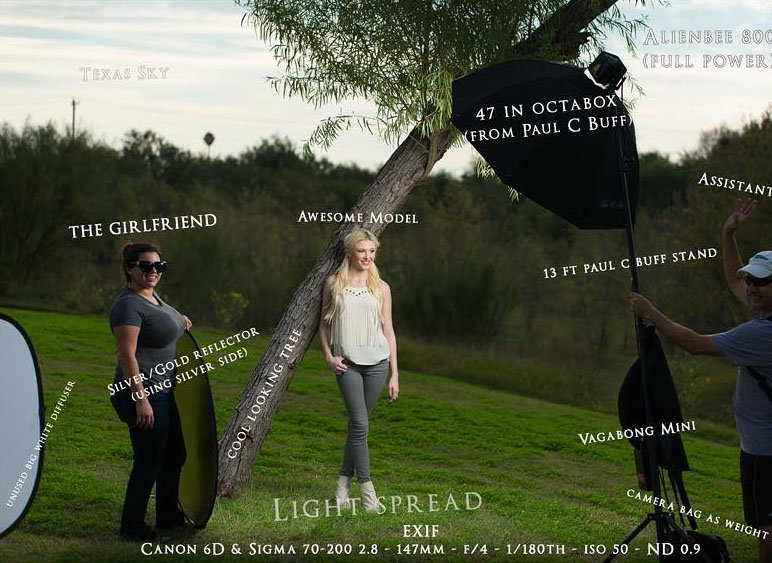
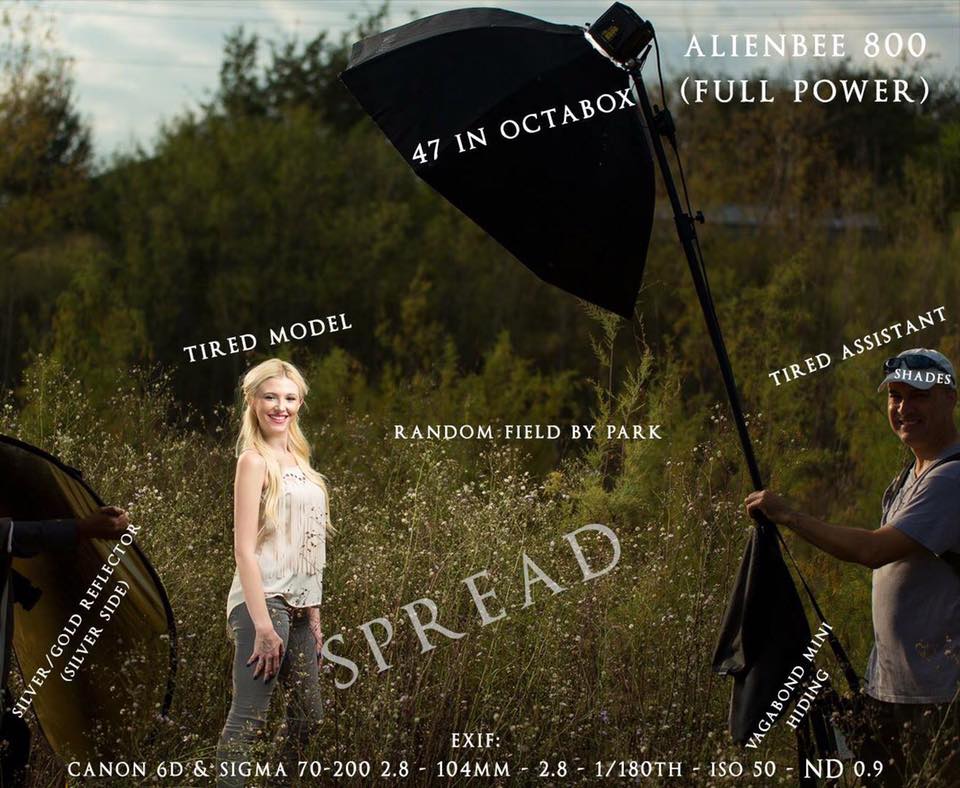
Enjoy looking at lighting diagrams to see how photographers light their photos? Check out the way photographer Joey Hernandez shares his. Instead of sharing simple 2D layouts showing his gear and placements, Hernandez shoots behind-the-scenes photos of his shoots and overlays helpful (and humorous) labels across important (or random) things in the shot.
For example, the diagram above shows how he shot this self-portrait in his mom’s driveway:
Here are some of his other lighting diagrams followed by the portraits that resulted (click the diagrams to see a larger version):
You can find more of Hernandez’s work on his website, Facebook, 500px, Instagram, and Twitter.
(via DIYPhotography) Image credits: Photographs by Joey Hernandez and used with permission